
Airtable vs Monday.com: One's a Database. The Other Pretends to Be.
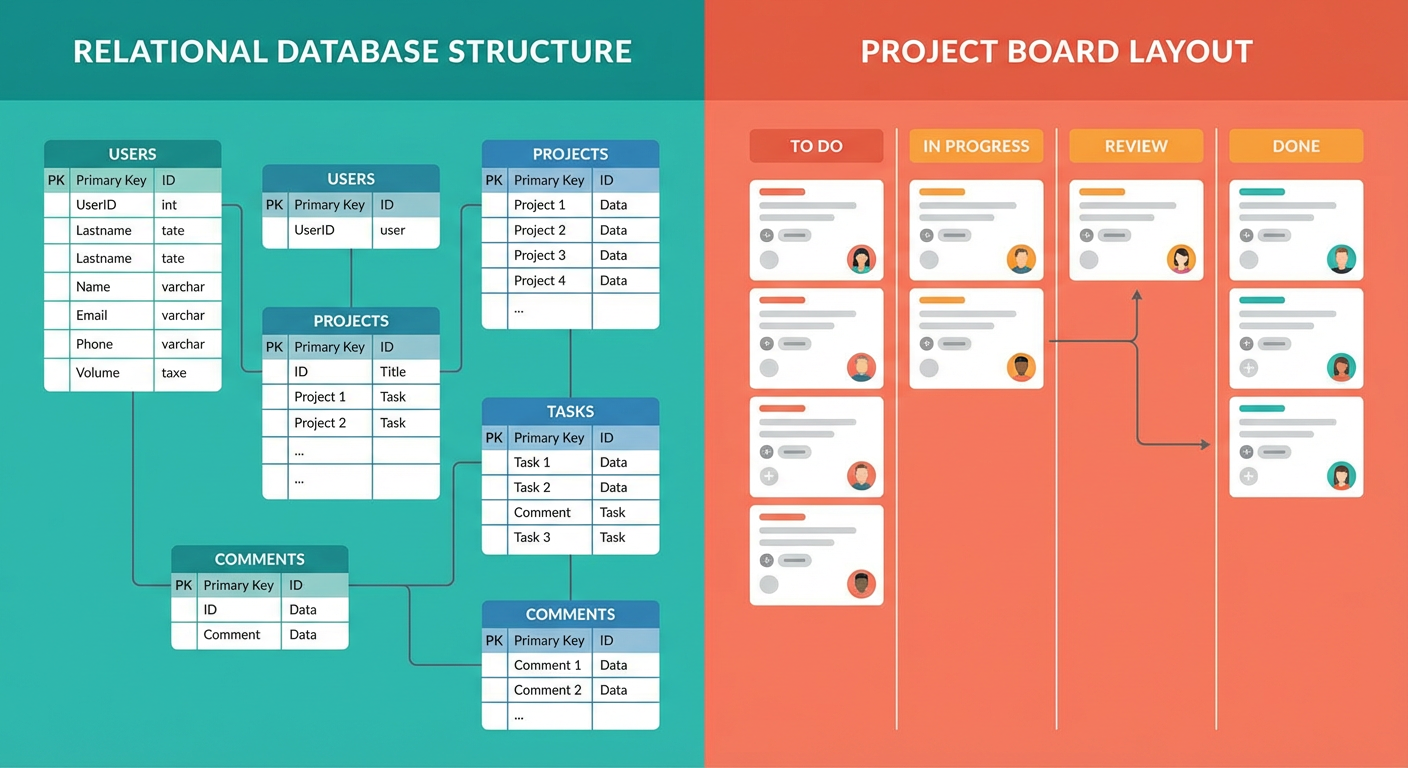
Diana used Monday.com at her last company for about two years. When she joined our team, she asked why we were using Airtable instead. "Monday does everything Airtable does, plus it has built-in project management," she said. I told her to give Airtable a month and we'd talk.
Three weeks in, she sent me a message: "Airtable is a completely different thing. I thought they were competitors. They're not."
She was right, but it took using both to understand why. Monday.com and Airtable look similar in screenshots. Both have rows and columns. Both have colored labels and status indicators. Both let you switch between views. If you're evaluating them side by side on a features page, they seem interchangeable. In practice, they're built for different jobs, and the gap shows up the moment you try to push either one past its intended use case.
What Monday.com Actually Is
Monday.com is a work management platform. It's designed around boards, items, and subitems. Each board is a collection of items, and each item represents a unit of work: a task, a project, a campaign, a sprint item. The columns on a board track properties of that work: status, owner, due date, priority, timeline.
The interface is optimized for people who manage work. The default view is a table, but it's a table that looks like a project plan. Status columns use color-coded labels. Timeline columns show Gantt-style bars. The dashboard view aggregates data from multiple boards into charts and widgets. Everything is oriented toward answering the question: "Where does this project stand?"
Monday.com does this well. When Anya evaluated it for our project management, she liked the dashboards, the timeline view, and the way dependencies worked between items. "It feels like it was designed by a project manager," she said. That's accurate. The tool makes project managers' lives easier.
The issue comes when you try to use Monday.com as a database. And Monday.com encourages this. Their marketing talks about "Monday DB" and database-like features. They have formula columns, lookup columns, and the ability to connect boards. But the underlying model is still items-on-a-board, not records-in-a-table. The distinction matters.
What Airtable Actually Is
Airtable is a relational database with a spreadsheet interface. The foundational concept is a table with typed fields. Each field has a specific data type (text, number, date, single select, multi-select, linked record, formula, rollup, lookup). The data types are enforced. You can build relationships between tables using linked record fields. You can write formulas that reference data across those relationships using rollups and lookups.
This is boring to describe and powerful in practice. When Tomás tracks our sales pipeline in Airtable, he doesn't just have a list of deals. He has a Deals table linked to a Contacts table linked to a Companies table. A formula on the Deals table rolls up total deal value by company. A lookup field pulls the company's industry from the Companies table into the deal view. A rollup calculates the average deal cycle time for each sales rep.
None of this is possible in Monday.com without external tools. Monday's "connect boards" feature links items across boards, but you can't roll up values from connected items using native formulas. You can't build multi-level relational queries. The data model is flat. One board, one level of items, subitems if you need hierarchy. That's the ceiling.
Structure and Flexibility
Monday.com gives you structure out of the box. Create a new board for marketing campaigns and you get a template with status columns, timelines, owners, and a pre-configured workflow. The templates are polished. Elena tried the content calendar template and had a working board in ten minutes.
The trade-off is that customization has limits. Monday's column types are designed for work management: status, people, date, timeline, numbers, text. If you want a column type that doesn't fit the work management paradigm (a barcode field, a currency field with specific formatting, a formula that calculates days between two dates), you'll find the options thinner than Airtable's.
Airtable gives you a blank canvas. You build your own structure, choose your own field types, define your own relationships. The upside is total flexibility. The downside is that you start from zero. There are templates, but they're starting points, not opinionated workflows. Kenji spent about four hours setting up our engineering task tracker in Airtable because he wanted a specific combination of linked tables, rollup calculations, and filtered views. Monday.com's sprint template would have given him 80% of that in ten minutes, but the missing 20% was the stuff he actually needed.
Views: Wider vs Deeper
Monday.com has chart views, dashboard views, workload views, and a map view. The dashboard view is where Monday really shines. You can pull widgets from multiple boards into a single dashboard and build a real-time overview of work across teams. Anya spent an afternoon building a Monday dashboard at her previous job that showed project health across four teams with burn-down charts and bottleneck indicators. She's never been able to replicate that in Airtable.
Airtable's views are per-table, not cross-base. Grid, Kanban, calendar, gallery, timeline, Gantt, form. Each view is a filtered, sorted, grouped perspective on a single table. The views are fast and highly configurable, but there's no native dashboard that aggregates data across multiple tables into a single visual summary. You can build interface pages with Airtable's Interface Designer, but it's more limited than Monday's dashboards.
Where Airtable's views win is precision. You can filter on any field with any condition, group by multiple fields, color records based on conditions, and hide/show specific fields per view. Tomás has six views of the same pipeline table, each configured for a different purpose: his personal pipeline, the team's full pipeline, deals closing this month, stale deals, deals by industry, and a form view for new lead intake. Switching between them is instant because they're all the same data with different lenses.
Automation: Templates vs Triggers vs Goals
Monday.com's automations are template-driven. You pick from a menu: "When status changes to X, notify person Y." "When date arrives, create an item." "When column changes, move item to group." The templates cover common work management patterns and they're easy to set up. No coding required. Diana configured six automations on her first day with Monday at her old job.
The limitation is that you're working within Monday's automation vocabulary. If the automation you want isn't in the template library, you're stuck. Custom integrations require Monday's "Integrations" feature or an external tool like Zapier. The scripting capability exists (Monday apps and custom workflows) but the learning curve steepens fast.
Airtable's automations are trigger-driven with more flexibility. You can write JavaScript scripts as automation actions, call external webhooks, and build multi-step sequences with conditional logic. The trigger types are broader (record created, record updated, record enters view, scheduled time, incoming webhook). For a developer like Kenji, Airtable's automation system is more capable. For a project manager like Anya, it's more work to configure.
Then there are agents, which operate at a different level entirely. An agent doesn't follow a template or wait for a trigger. It reads the data, understands the state of things, and takes action toward a goal. The Airtable data cleanup agent doesn't fire when a record is created or when a status changes. It evaluates the entire base, finds records that need attention (duplicates, missing fields, stale entries, formatting inconsistencies), and fixes them. That's not an automation. That's a worker.
Monday's template automations are the fastest to set up. Airtable's trigger automations are the most flexible to customize. Agents handle the work that neither system can automate natively because the work requires judgment, not just execution.
Pricing Reality
Monday.com's pricing starts at $9 per seat per month for the Basic plan, but most teams need the Standard plan ($12/seat/month) for automations and integrations, or the Pro plan ($19/seat/month) for time tracking, formula columns, and chart views. The automations have a monthly action limit that varies by plan.
Airtable's Team plan is $20 per seat per month. More expensive per seat, but the feature set is more uniform. You don't need to upgrade tiers to unlock formula fields or views.
For a team of 10, Monday Standard costs $120/month and Airtable Team costs $200/month. The price difference isn't dramatic, and the real cost is in the time your team spends working within each tool's constraints. If you pick Monday for database-heavy work, you'll spend hours working around its data model limitations. If you pick Airtable for project management, you'll miss Monday's dashboards and templates.
Who Should Use Which
Diana's conclusion after three weeks on Airtable was this: "Monday is for teams that manage work. Airtable is for teams that manage data. If your work is mostly tasks and timelines and you want a tool that looks like a project plan out of the box, Monday is great. If your work involves structured data with relationships between records and you need to compute things across that data, Airtable is the only real option."
That maps to what we've seen. Marketing teams and operations teams that are primarily tracking task completion, deadlines, and workloads tend to prefer Monday. Sales teams, data teams, and anyone who needs relational data, formulas, and flexible field types tends to prefer Airtable.
The automation question is a tiebreaker. If your automations are simple (status changes trigger notifications), both tools handle them fine. If your automations require multi-step logic, external API calls, or conditional branching, Airtable's scripting gives you more room. And if your automations require judgment (which records are duplicates, which deals need attention, which data quality issues need fixing), you need an agent on top of whichever platform you choose.
Priya, who came from a Monday.com shop, put it simply: "Monday told me where my projects stood. Airtable tells me where my data stands. They're different questions."
Try These Agents
- Airtable Data Cleanup Agent -- Find duplicates, fix formatting issues, and flag stale records across your Airtable base
- Airtable Project Status Reporter -- Generate automated project reports from your Airtable tracking base
- Airtable Content Calendar Manager -- Manage editorial calendars with automated scheduling and gap detection