
Confluence vs SharePoint: One Is a Wiki. The Other Is a File System Pretending.
Marcus inherited a documentation problem. His team of 40 had been using SharePoint for everything: SOPs, engineering specs, meeting notes, product requirements, onboarding checklists. It worked, in the same way a filing cabinet works -- stuff goes in, and then you spend 20 minutes rummaging around looking for it later. When the company acquired a smaller team that ran on Confluence, Marcus ended up managing both platforms for 18 months. Same team. Same documentation needs. Two different philosophies about what a "knowledge base" even means.
The comparison that follows isn't theoretical. It comes from watching the same people create, search, update, and eventually abandon content on both platforms. The answer isn't "one is better." The answer is they're different tools that happen to overlap in marketing copy.
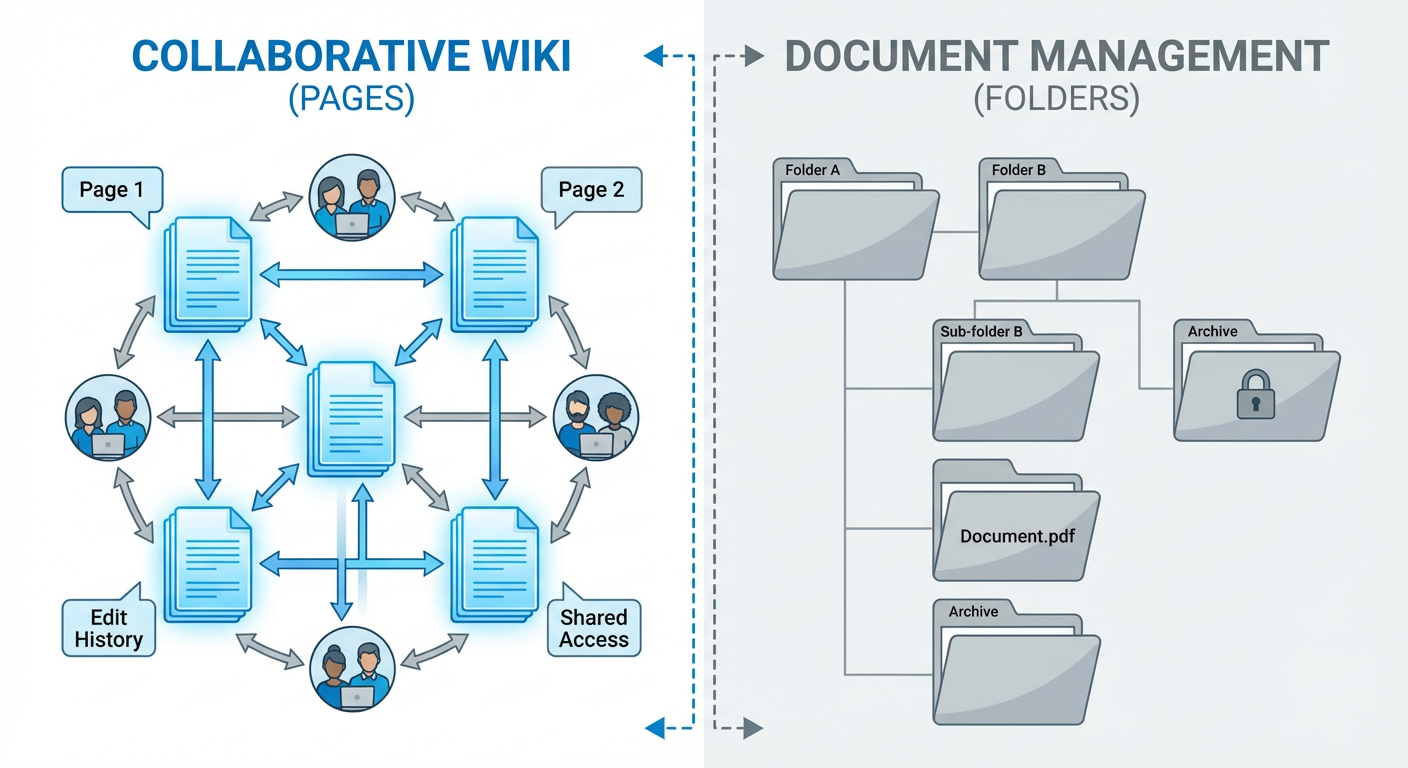
SharePoint Does Documents. Confluence Does Pages.
This sounds like semantics, but it changes everything about how people work. SharePoint thinks in files. You create a Word doc, a PowerPoint deck, or an Excel sheet, and SharePoint stores it. The document lives inside SharePoint the way a file lives on your desktop. Download, edit, upload. Co-authoring in SharePoint Online has smoothed out some of the friction, but the underlying mental model hasn't changed: files in folders.
Confluence thinks in pages. You write directly in the browser. There's no file to download -- the content is the page. Pages nest under other pages in a tree, link to each other, and you can embed pieces of one page inside another using macros. It's a wiki in the original Ward Cunningham sense: a web of interconnected documents that know about each other.
Diana noticed the difference within her first week. In SharePoint, she'd create a Word doc called "API Authentication Guide v3.2," upload it to the Engineering folder, and hope someone stumbled across it. In Confluence, she created a page called "API Authentication," linked it from both the API Overview and Getting Started pages, and suddenly the content had a home in a navigable structure. Six months later, her Confluence pages averaged 340 views each. Her SharePoint equivalents? Twelve downloads.
The discoverability gap was that stark.
Where SharePoint Actually Wins
SharePoint has real strengths, and dismissing it as "just a file system" misses the point.
The Microsoft 365 integration is the big one. If your organization lives in Teams, Outlook, Word, and Excel, SharePoint is already woven into everything. Embed a document library in a Teams channel and people access files without switching contexts or opening new tabs. Elena's compliance team stores audit documents in SharePoint and works on them entirely through Teams. For orgs deep in the Microsoft ecosystem, that level of integration genuinely reduces friction. Confluence can't replicate it -- it's a different planet.
Permissions are more granular in SharePoint, and it's not close. Item-level, folder-level, site-level, all tied into Azure Active Directory groups. Confluence gives you space-level and page-level restrictions, which covers most use cases but falls short when regulated industries need document-specific access controls mapped to specific AD groups. You can work around it in Confluence, but it always feels like a workaround.
And then there's formal document management. Version history with check-in/check-out, metadata columns, content types, retention policies, approval workflows -- SharePoint was purpose-built for this stuff. When Rafael's compliance team needs mandatory review dates and controlled distribution lists, SharePoint handles it natively. Confluence treats everything as a wiki page, which is great for collaborative writing but doesn't have the document lifecycle tooling that regulated teams depend on.
Rafael's team keeps their ISO compliance documentation in SharePoint. Mandatory review dates, approval chains, controlled distribution lists. He tried moving one set of documents to Confluence as an experiment. "It felt like using a whiteboard for legal contracts," he said. The information was there, but the governance wasn't.
Where Confluence Actually Wins
Confluence wins on collaborative knowledge creation, and the margin is wide.
Page trees give you structure that SharePoint's flat folder model can't replicate without significant customization. A Confluence space for "Engineering" can have a page tree that goes Engineering > Backend > Services > Authentication > OAuth2 Implementation. Every level is its own page with content, comments, and children. To get something similar in SharePoint you'd stack site collections, document libraries, folders, and metadata columns -- and the end result still feels like browsing a file system, not navigating a knowledge base.
Real-time editing is where Confluence punches above its weight. Multiple people writing on the same page, cursors visible, changes merging automatically. SharePoint Online does co-authoring in Word, but your experience depends heavily on whether you're in the web app (reasonably smooth) or the desktop app (merge conflicts are still a thing in 2026). Confluence's editing feels closer to Google Docs than to anything in the Microsoft stack.
Templates and macros are Confluence's secret weapon, honestly. A "Decision Log" template with pre-built sections. A "Retrospective" template with voting macros baked in. A "Technical Spec" template with status indicators and auto-generated table of contents. These aren't cosmetic -- they enforce consistency across hundreds of pages without anyone having to think about it. Marcus's team built 11 templates in their first month. The SharePoint equivalent was a folder of Word templates that nobody opened after week two.
Search in Confluence is better for knowledge retrieval. This is partially because wiki-style content with links and page titles is easier to index than binary files, and partially because Confluence's search understands page hierarchies and labels. Kenji searched for "deployment rollback" on both platforms. Confluence returned the exact page in 0.3 seconds. SharePoint returned seven Word documents, three of which were outdated versions of the same guide.
The Problem Both Share
Here's what 18 months of running both platforms taught Marcus: the tool doesn't matter if nobody maintains the content.
After 18 months, Marcus audited both platforms. In SharePoint, 34% of documents hadn't been updated in over a year. In Confluence, 41% of pages were stale by the same measure. Different tools, same decay rate. The engineering team had adopted Confluence enthusiastically, created hundreds of pages in the first three months, and then gradually stopped updating them as priorities shifted. The compliance team maintained their SharePoint documents because regulatory requirements forced them to. Voluntary documentation rotted at the same rate regardless of platform.
All of Confluence's search and discoverability advantages evaporate when half the results are wrong. Diana searched for "rate limiting" and got three hits: one from 2024 with the old limits, one from 2025 with partially updated numbers, and a draft that never got published. She ended up walking over to an engineer's desk to ask which was current. The wiki structure that made Confluence so navigable also turned it into a maze of contradictory information once pages stopped getting maintained.
SharePoint's document management features don't help either if nobody triggers the review workflow. Rafael's compliance docs stayed current because the review dates were enforced. The engineering SOPs in SharePoint? Same staleness problem as Confluence. The governance features exist but only work when someone configures and enforces them.
What Actually Fixes the Maintenance Problem
A documentation updater agent changes the math entirely. It removes the part where humans have to remember to go back and update things -- which, as we've established, they won't. The agent runs on a schedule, reads pages, compares what's written against current reality, and either fixes things directly or flags them for review. Works against Confluence, works against SharePoint. Doesn't care about the platform.
Marcus pointed it at Confluence first. Within a week: 23 pages with outdated API endpoints, 8 referencing deprecated features, 4 with broken links to tools that had been renamed. Nineteen of those got fixed automatically. The remaining 12 needed a human because the changes were substantive enough that a PM had to weigh in.
Six weeks later, the stale content rate went from 41% to 14%. Nobody suddenly became more disciplined about documentation. The agent just did the work that people weren't doing.
The Decision Framework
SharePoint is the right call if your org is deep in Microsoft 365, you need formal document governance (approval workflows, retention policies, check-in/check-out), compliance requires permissions tied to AD groups, or your content is mostly Office files rather than wiki pages.
Confluence makes more sense when your team writes collaboratively, your content is interconnected and benefits from page trees and cross-linking, you want templates and macros to enforce structure, or finding things through search and navigation matters more to you than document lifecycle management.
Running both is also a legitimate option if the needs genuinely split. Marcus's team still does -- compliance docs in SharePoint, engineering knowledge in Confluence. It works because each platform handles what it was actually designed for, rather than being forced into a role it wasn't built for.
Whichever you choose, budget for maintenance. The tool that stores knowledge isn't the same as the tool that keeps it current. That second tool doesn't come in the box with either platform. It's a layer you add yourself, or it's a gap you live with until 40% of your knowledge base is wrong.
Marcus's summary after 18 months: "SharePoint is where documents go to be governed. Confluence is where knowledge goes to be shared. Neither is where content goes to stay accurate. That takes something else entirely."
Try These Agents
- Confluence Documentation Updater -- Automatically detect and update stale content across your Confluence spaces
- Confluence Knowledge Base Auditor -- Audit your wiki for outdated pages, broken links, and content gaps
- Confluence Cross-Space Search Agent -- Search across all Confluence spaces with context-aware results