
Supabase API Automation: CRUD Operations Without Writing Endpoints
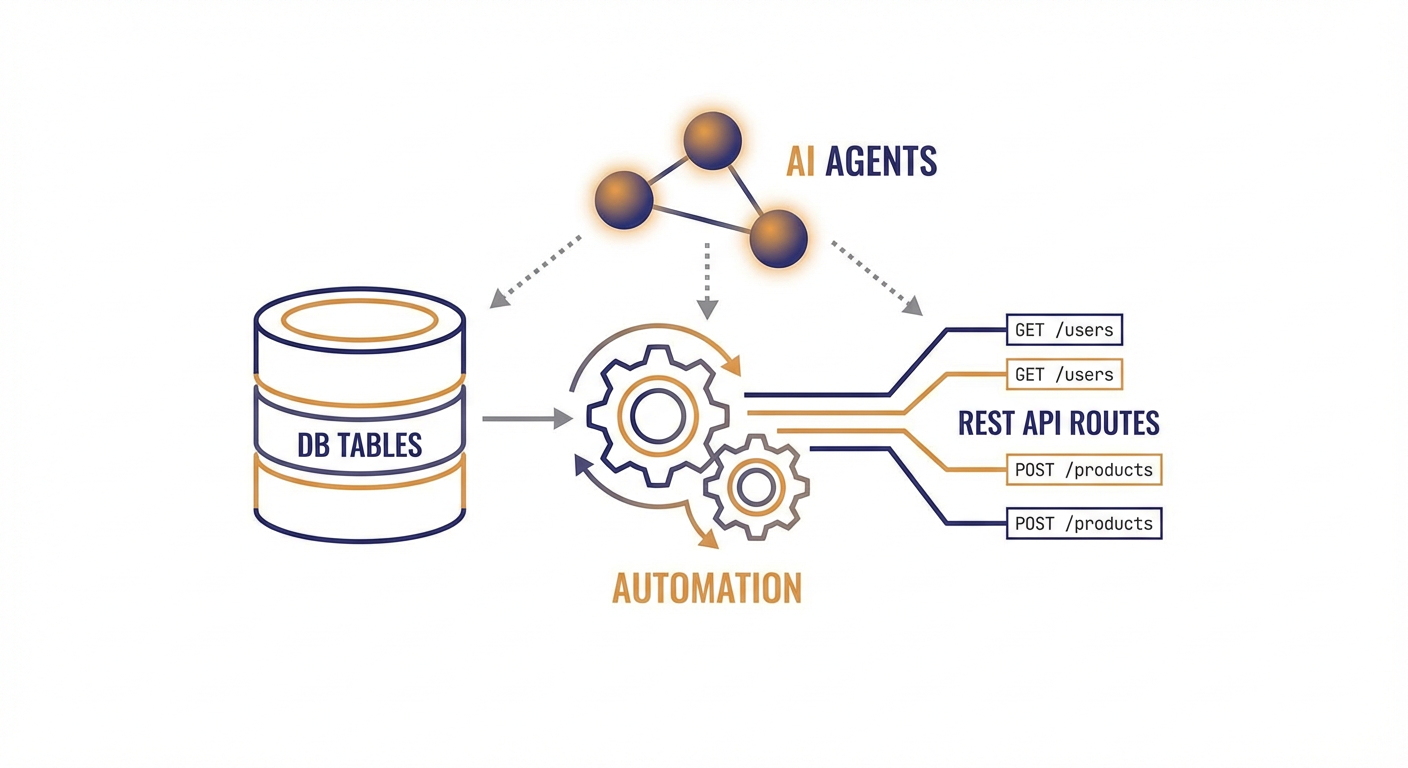
Diana works full-stack at a mid-stage SaaS company. She spent the first two years of her career writing Express routes. POST /users. GET /users/:id. PATCH /users/:id. DELETE /users/:id. Then she'd write the same four routes for orders. And products. And invoices. And comments. She once counted 47 CRUD endpoints in a single service. Forty-seven routes doing essentially the same dance with different table names.
Then she found Supabase, and PostgREST changed everything.
PostgREST: The API You Don't Have to Write
You probably know Supabase sits on PostgreSQL. What's less obvious until you actually use it is how PostgREST changes everything -- it auto-generates a full REST API for every table, view, and function in your schema. Create a table, and the endpoints already exist. No controllers. No route files. No middleware chain. Just a URL.
All users? GET /rest/v1/users. Users in Portland? GET /rest/v1/users?city=eq.Portland. Insert something? POST /rest/v1/users with a JSON body. Filtering, sorting, pagination, full-text search, bulk operations -- all baked in from the start.
For Diana, this translated to deleting roughly 80% of her backend code. Not refactoring -- deleting. Weeks of hand-built API layer, replaced in seconds.
But here's what nobody seems to talk about: having an API and having an operations layer are two completely different things. The endpoints exist, sure. Sure, the endpoints exist. But who's actually calling them at scale? When Diana's ops team needed to bulk-update 3,000 customer records after a pricing tier change, nobody was going to sit there curling the REST API 3,000 times. They'd write a script. And that script would end up living on someone's laptop -- un-versioned, un-tested, forgotten until the next time someone needed it, at which point they'd just write a new one from scratch.
The Script Graveyard
Every team that uses Supabase long enough builds a graveyard of one-off scripts. Python notebooks for data migrations. Node scripts for cleanup jobs. SQL files pasted into the Supabase dashboard. They accumulate like laundry.
Diana's team had a Notion page called "Useful Scripts" with 23 entries. Twelve of them were broken because the schema had changed. Three referenced tables that no longer existed. One had a hardcoded API key from a developer who'd left the company six months ago.
The problem isn't Supabase. The API is fine. The fundamental issue: human-driven data operations just don't scale. Every bulk update, every cleanup pass, every cross-table sync requires somebody to write code, test it, run it, verify the output, and then promptly forget it exists. Next time the same operation comes up? The whole cycle starts over.
Filtering, Pagination, and the Complexity Cliff
PostgREST's filtering syntax is powerful once you learn it. You can do ?age=gte.21&city=eq.Portland for compound filters. You can use select=id,name,orders(total) for embedded resources (basically joins via foreign keys). You can paginate with Range headers or limit and offset parameters.
But power creates complexity. Diana's team started hitting what I call the complexity cliff — the point where the query you need is technically possible via the API but painful to construct. Nested filters across three tables with specific ordering and pagination? You can do it. You'll spend an hour getting the syntax right. And the next person who needs a similar query will spend another hour because the syntax isn't exactly intuitive.
This is where most teams reach for a query builder library, or give up and write raw SQL. Both are fine solutions for developers. Neither is a solution for the ops person who needs to pull a report.
AI Agents as Your API Layer
Here's the shift that changed things for Diana's team. Instead of writing scripts against the Supabase API, they started describing operations in plain language and letting AI agents handle the CRUD.
Need to update all users who signed up before January 2026 and haven't verified their email? Instead of writing a script that filters, paginates through results, and patches each record individually, you just describe what you want done. The agent reads the schema, figures out the right filters, handles pagination on its own, and runs the updates.
Need to reconcile your users table with an external CRM export? The agent reads both data sources, matches records, spots conflicts, and resolves them based on rules you defined once.
The Supabase tools we built at Cotera — Create Record, Read Records, Update Record, Delete Record, and Upsert Record — give agents full CRUD access to your database. The key difference from a script: the agent doesn't just fire off API calls in sequence. It reasons about what needs to happen, catches edge cases, and adapts on the fly when something unexpected crops up -- like a null in a field you assumed would always have data.
The Supabase Data Sync Agent is the one Diana's team reaches for most. It keeps tables aligned across sources -- no more duct-tape scripts that explode the moment someone renames a column. You tell it what "in sync" means, and it figures out the rest.
What This Actually Looks Like Day-to-Day
Before agents, Diana's typical Monday meant triaging three Slack messages about data that "looked wrong," verifying whether a weekend cron job actually ran, and banging out a SQL query to fix a batch of records somebody imported with the wrong status.
After agents, her Monday starts with coffee. The sync agent had run overnight and dropped a summary in Slack: 142 records synced, 3 conflicts resolved per the rules she'd set up, zero errors. The cleanup agent flagged 7 duplicate records for review but left them alone -- she'd configured it to hold off on anything destructive until she approved it.
She still writes plenty of code -- she's a developer, after all. But now it's code that ships features, not code that cleans up after other code.
When to Use the API Directly vs. an Agent
I'm not suggesting you route every API call through an agent. For your application code — the user-facing reads and writes that power your product — you should use the Supabase client library directly. It's fast, it's typed, and it's designed for that use case.
Agents are for the operational layer. The stuff that happens behind the scenes:
- Bulk updates across thousands of records
- Data cleanup and deduplication
- Cross-system synchronization
- Scheduled data transformations
- Ad-hoc queries that ops and support teams need
These are the operations that generate the script graveyard. They're the ones that eat developer time without producing features. Let agents handle them so your developers can build things that actually ship.
Stop Writing Endpoints. Stop Writing Scripts.
Supabase already eliminated the boilerplate of building a REST API. The auto-generated endpoints via PostgREST mean you can go from schema to working API in minutes. That was the first revolution.
The second revolution is eliminating the operational scripts that pile up around that API. AI agents that can read your schema, grok your data, and execute CRUD operations at scale aren't coming for developer jobs. They're coming for the tedious, repetitive, error-prone grunt work that developers never wanted to do in the first place -- and honestly, shouldn't have to.
Diana still has that Notion page of scripts. She just hasn't added to it in months.
Try These Agents
- Supabase Data Sync Agent — Sync data between Supabase tables and external sources without brittle scripts
- Supabase Database Cleanup Agent — Find and resolve duplicate, orphaned, and stale records automatically
- Supabase User Data Manager — Manage user records and properties across your Supabase database
- Supabase Content Publisher — Create and manage content records in Supabase