
Supabase Database: The Postgres Features Most Teams Ignore
Marcus does backend work at a Series A startup. His team adopted Supabase nine months ago. They use it the way most teams use it: create tables in the dashboard, read and write data through the client library, set up some auth. And it works fine -- the app is in production, users are happy, the team ships weekly.
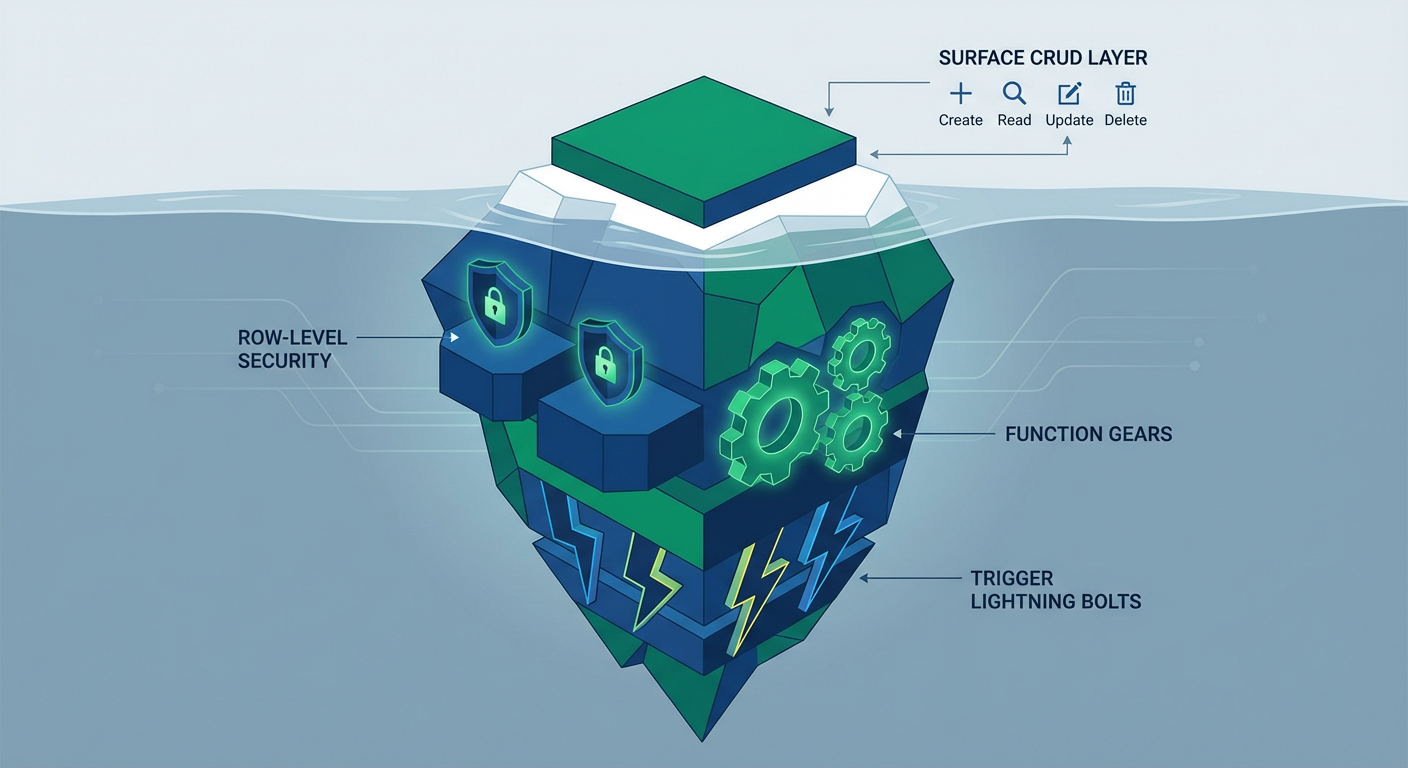
But Marcus can't shake the feeling that they're barely scratching the surface. Supabase is not just a hosted database with a REST API. It is a full Postgres instance. That means every feature Postgres has accumulated over 30 years of development is available. Row Level Security. Server-side functions. Triggers. Extensions. Foreign data wrappers. Full-text search. The problem is that most teams never use any of it.
I talked to Marcus about what happened when he started digging into the Postgres features his team had been ignoring.
Row Level Security: The Feature That Changes Everything
Row Level Security (RLS) is the Postgres feature that Supabase is most known for, and also the feature that most teams configure incorrectly or skip entirely.
Here is the concept. Rather than scattering permission checks throughout your application code ("does this user have access to this row?"), you define access rules directly in the database. Then the database enforces those rules on every single query, no matter how it arrives -- client library, REST API, raw SQL, background job, whatever.
Before RLS, Marcus's team had permission checks scattered across their API handlers. Every endpoint had a block of code that fetched the current user, checked their organization, and filtered the query. The code worked, but it was duplicated across 34 endpoints. When they added a new role type ("viewer" with read-only access), they had to update every endpoint.
After implementing RLS, the permission logic lived in one place. One policy on the projects table: "you can only see projects where your org_id matches the project's org_id." A separate policy for viewers that restricted write operations. Every query, from every source, automatically filtered by these rules.
The part that surprised Marcus was how much application code he could delete. Thirty-four endpoint permission blocks reduced to five RLS policies. And they're more secure, because a developer can't accidentally ship a new endpoint without the permission check -- the database won't let the data through regardless.
The mistake most teams make. They flip RLS on but write overly permissive policies -- or they write policies that work today and silently break when new features land. Marcus's advice: start with deny-everything, then whitelist specific access per use case. And actually test the policies by querying as different user roles before you push anything to production.
Server-Side Functions: Moving Logic to the Database
Postgres functions (people call them stored procedures, but they're technically different -- don't @ me) let you run logic inside the database itself. Supabase exposes these through the REST API, so your client code can call them the same way it calls any other endpoint.
Marcus's team kept hitting the same pattern: read from one table, transform it, write to another. Take onboarding -- when a user finished their checklist, the app had to read the checklist items, calculate completion percentage, update the user's profile, and log an activity entry. Four round trips between client and database, every time.
Wrapped in a Postgres function, it's one call. Read, calculate, update, log -- all in a single transaction. If anything blows up, the whole thing rolls back cleanly. No partial state. No four round trips. One call.
The performance difference wasn't subtle. The four-round-trip version clocked in at 180-240ms depending on network conditions. The function version? 12ms. The gap gets worse on mobile connections.
When to reach for functions. Anything that reads and writes across multiple tables in sequence. Aggregation queries you run over and over (DAU, revenue summaries, usage stats). Validation logic that depends on data in other tables -- better to put it where the data lives than to shuttle everything to the application layer and back.
When not to use functions. Logic that changes every sprint should stay in application code where it's easier to deploy and test. Business rules that non-engineers need to understand should be visible in the application layer, not hidden in SQL. And anything that calls external APIs should not be in a database function. Database functions should operate on data, not on network I/O.
Triggers: Automating Reactions to Data Changes
Triggers are functions that fire on their own when data changes. Drop a row into the orders table and a trigger can automatically update inventory, create an audit log entry, and ping a webhook -- all without your application code lifting a finger.
Marcus described triggers as "the feature that made me realize we were building half our backend by hand." His team had application code that listened for database changes (via Supabase Realtime) and then performed follow-up operations. A new order would trigger a Realtime event, the client would catch it, call an API endpoint, which would update inventory, create the audit log, and send the notification. Three moving parts (Realtime subscription, API endpoint, handler logic) for something that should be one.
With triggers, the follow-up operations happen inside the database, in the same transaction as the original insert. No Realtime subscription. No API endpoint. No handler logic. The trigger fires, the function runs, and the data is consistent.
The inventory tracking example. Marcus's team tracks inventory for a B2B supply chain tool. Insert an order_items row, and a trigger decrements the matching inventory record. Cancel an order (flip the status to "cancelled"), and a trigger adds the inventory back. The logic lives in two trigger functions, each about 15 lines of SQL. Before triggers, this logic was spread across three API endpoints and a background job that ran every five minutes to "catch" any missed updates.
We use a similar pattern with the data sync agent to keep cross-system data in sync. The agent uses Supabase's CRUD tools to read records that have been flagged by triggers as needing synchronization, then pushes the changes to external systems. Triggers handle the intra-database reactions. Agents handle the cross-system orchestration.
Extensions: The Postgres Superpower
Postgres extensions are installable modules that add capabilities to the database. Supabase lets you enable extensions through the dashboard with a single click. Most teams use zero extensions. They're leaving serious capabilities on the floor.
pg_trgm for fuzzy search. The pg_trgm extension does trigram-based similarity matching. Typo "Jonh"? Still matches "John". Marcus added it to their customer search and the sales team noticed immediately: "search actually works now." It replaces Elasticsearch for most simple search use cases.
pgcrypto for encryption. Column-level encryption for sensitive data (API keys, tokens, PII). A defense-in-depth measure on top of Supabase's default encryption at rest.
pg_cron for scheduled jobs. Run SQL statements on a schedule inside the database. Marcus uses it for nightly cleanup (deleting expired sessions, archiving old logs) and weekly aggregations. No external cron service needed.
PostGIS for geospatial. If your app touches anything location-related, PostGIS basically turns Postgres into a GIS. Query for records within 10km of a point, calculate distances, check whether something falls inside a polygon -- all in SQL. All in SQL.
Each extension replaces a service Marcus's team would otherwise need to set up and maintain separately. The total infrastructure surface area shrinks.
What Makes Supabase Different From Managed Postgres
Fair question: if Supabase is "just Postgres," why not stick with AWS RDS, Google Cloud SQL, or any other managed Postgres host?
Honest answer: Supabase layers four things on top of Postgres that meaningfully change the day-to-day developer experience. Auto-generated REST APIs via PostgREST (every table and function becomes an endpoint without writing API code). Auth integrated with RLS (Supabase Auth injects the user's ID into every query so RLS policies can reference auth.uid()). Realtime built on Postgres logical replication (row changes push to clients via WebSocket without a separate server). And the dashboard, a developer-friendly GUI for Postgres administration.
Marcus said the dashboard was the unlock: "I knew Postgres had triggers. I just never used them because setting them up felt like DBA work. The Supabase dashboard made it feel like application development."
Automating Database Operations
Once Marcus's team got comfortable with these Postgres features, the natural next question was: what about the repetitive database grunt work that still needed a human in the loop?
The data sync agent keeps Supabase tables and external systems in lockstep. CRM record changes? The agent picks it up and upserts the matching Supabase record. Supabase record changes? The agent pushes the update downstream.
The database cleanup agent runs on a weekly cadence, hunting for orphaned records (rows pointing at deleted parents), stale sessions, and duplicate entries that sneaked past application-level uniqueness checks. Before the agent, Marcus ran these cleanup queries manually once a month. Now they run automatically and the results are logged for audit.
The content publisher agent takes care of their CMS tables -- creating records, flipping status fields, managing publication timestamps. All through CRUD operations instead of building yet another custom admin panel.
These agents work as well as they do precisely because the data sits in Postgres. Relational data with enforced schemas means agents can read and write records with predictable structure. RLS policies ensure agents operate within the correct permission boundaries. Triggers handle the downstream reactions automatically.
Marcus's summary: "We spent nine months using Supabase like a Firebase replacement. Then we spent one month learning Postgres features and it became a completely different platform. The database is not just where the data lives. It is where the logic lives."
Try These Agents
- Supabase Data Sync Agent -- Sync records between Supabase tables and external data sources with automated conflict handling
- Supabase Database Cleanup Agent -- Find and remove stale, orphaned, and duplicate records on a schedule
- Supabase Content Publisher -- Create and manage content records with status tracking and publication workflows