
Supabase vs AWS: When a BaaS Beats Building It Yourself
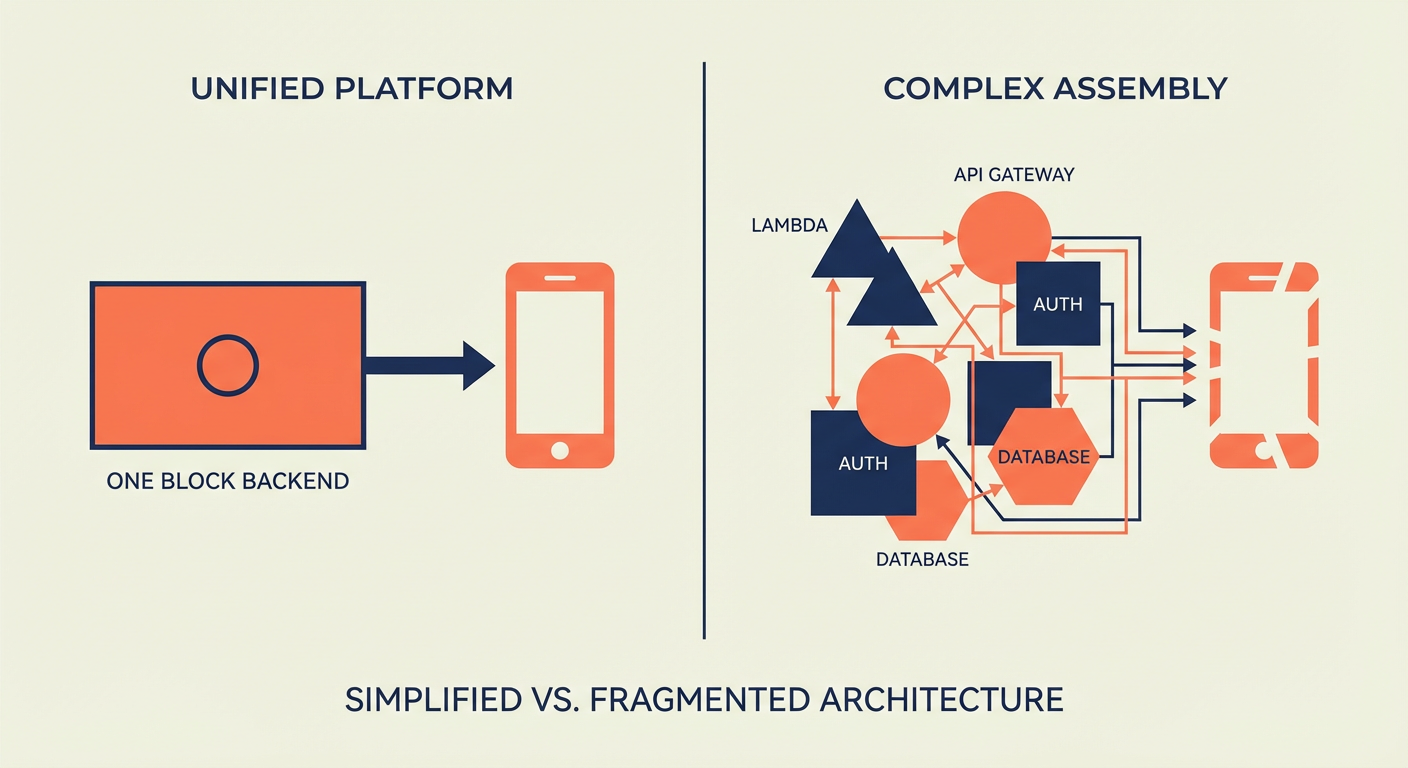
Kenji has been shipping production systems on AWS for seven years now. The guy can spin up a VPC with Terraform in his sleep, has opinions about CloudFormation vs CDK that he'll share whether you ask or not, and once spent a Saturday debugging an IAM role with 47 policy statements -- and genuinely had a good time doing it.
When his new startup needed a backend, muscle memory kicked in: RDS for the database, Lambda for serverless functions, Cognito for auth, API Gateway for the REST layer. He'd built that exact stack five times before. It works, it scales, and he trusts it.
Then his co-founder asked a simple question: "How long until we have a working API?"
Kenji estimated two weeks. His co-founder opened Supabase, created a project, threw together a schema, and had a working API with auth in roughly 45 minutes. That kicked off a three-month-long argument that ended with them choosing Supabase for the MVP -- and Kenji grudgingly admitting it was the right call.
The AWS Tax: Assembly Required
Let me spell out what "rolling your own backend on AWS" actually entails for a typical web app, because people underestimate this constantly.
Database. You provision an RDS PostgreSQL instance. You configure the security group, the subnet group, the parameter group -- each one has its own page of options that you'll second-guess later. You set up automated backups. You decide on Multi-AZ (spoiler: skip it now, regret it later). You manage connection pooling yourself, probably PgBouncer on an EC2 instance. Time: 2-4 hours for initial setup, then ongoing maintenance until the heat death of the universe.
Auth. Cognito. User pool, identity pool, hosted UI or roll your own login flow. Wire up social providers (Google, GitHub, whatever). Deal with Cognito's... let's call it "distinctive"... token format and refresh logic. Write custom Lambda triggers for post-confirmation and pre-signup hooks. Time: 1-2 days, plus the existential dread of reading Cognito docs.
API layer. API Gateway -- REST API or HTTP API, pick your flavor. Write a Lambda function for each endpoint. Configure routes, methods, integrations. Set up request validation. Wire up Cognito as an authorizer. Deal with CORS. Deal with CORS again because the first time never works (it's a law of nature at this point). Time: 2-5 days depending on endpoint count.
File storage. S3 bucket with appropriate IAM policies. Pre-signed URLs for uploads. A Lambda function to handle post-upload processing. CloudFront distribution if you want a CDN. Time: half a day.
Realtime. This is where it gets fun. AWS has no simple realtime story. You can cobble something together with API Gateway WebSocket APIs, but you'll be managing connection state yourself (shoved into DynamoDB, usually). Or you stand up AppSync subscriptions, which brings its own learning curve. Or you run your own WebSocket server on ECS. Time: 1-3 days.
Add it all up and Kenji's estimate of two weeks was honest. He could build the entire backend in two weeks because he'd done it before. A less experienced team would take a month.
The Supabase Shortcut
Here's what the same setup looks like on Supabase:
Database. Create a project and boom -- PostgreSQL database, live, with connection pooling via Supavisor baked in. Automated backups on paid plans. Time: 2 minutes, most of which is waiting for the spinner.
Auth. Enable auth providers in the dashboard. Google, GitHub, email/password, magic link — toggle them on. Supabase's client libraries handle the login flow, token refresh, and session management for you. Time: 15 minutes, and that includes reading the docs.
API layer. It already exists. PostgREST generates REST endpoints for every table automatically. Add Row Level Security policies to control access. Time: 30 minutes for basic policies.
File storage. Supabase Storage comes out of the box. Upload through the client library, lock it down with policies (same pattern as RLS). Time: 10 minutes.
Realtime. Flip a toggle for the tables you care about. The client library manages WebSocket subscriptions under the hood. Time: 5 minutes, and half of that is deciding which tables need it.
Total: about an hour. Kenji's co-founder wasn't exaggerating.
The Real Comparison: Operations Over Time
The first-day setup difference is dramatic, but the more interesting comparison is what happens over the next twelve months.
On AWS, Kenji would be the infrastructure person. Security patches for the RDS instance. Lambda runtime updates when Node.js 18 hits end of life. API Gateway logging configuration. Cognito user pool migrations when you need a new attribute. CloudWatch alarm tuning. IAM policy audits. Each task is small. Collectively, they eat 10-15% of an engineer's time.
On Supabase, most of that is handled for you. Database upgrades, security patches, and infrastructure maintenance -- all Supabase's headache, not yours. You worry about your schema, your RLS policies, and your application code. Full stop.
Kenji found this deeply uncomfortable at first. He's the kind of engineer who likes controlling infrastructure -- it's basically his identity. Giving up that control felt like giving up quality. But three months of actually shipping features instead of debugging IAM policies forced him to admit something: the product got better precisely because he stopped tinkering with the plumbing.
Cost Comparison: It Depends (But Not How You Think)
The cost story between Supabase and AWS depends entirely on scale, and the crossover points aren't where most people expect.
At startup scale (< 10,000 users): Supabase wins on cost, and it's not even close. The Pro plan at $25/month gives you more than enough for a typical SaaS MVP. The equivalent AWS stack — RDS t4g.micro ($13), a modest Lambda usage ($5-15), Cognito ($0 for the first 50K MAUs but you're paying for the associated Lambda triggers), API Gateway ($3-10), S3 ($1-5), CloudWatch ($5-10) — runs $30-55/month in infrastructure alone. And that's just infra -- it completely ignores the engineering hours to set up and babysit it all, which is where the real money goes.
At growth scale (10,000-100,000 users): The gap narrows considerably. Supabase Pro with compute add-ons lands at $100-300/month. A well-tuned AWS stack costs about the same. Supabase still saves you engineering time at this scale, but the raw infrastructure bill difference is a lot less dramatic.
At large scale (100,000+ users): AWS can come out cheaper -- if you have engineers who know how to squeeze it. Reserved instances, savings plans, careful resource right-sizing can absolutely bring AWS costs below Supabase's price point. The catch is that you need those engineers on payroll, and they don't come cheap. The total cost of ownership calculation starts to depend more on your team's AWS expertise than on the raw infrastructure pricing.
Kenji's startup is firmly in the first category. They'll think about the second category in a year. The third category is a problem they'd love to have.
Lock-in: The Real Concern
Kenji's biggest concern with Supabase wasn't cost or capability. It was lock-in.
With AWS, he felt like he was building on primitives. RDS is just Postgres. Lambda is just code. S3 is just object storage. If he needed to leave AWS (unlikely, but possible), the concepts transfer everywhere.
Supabase is also just Postgres underneath, which helps. Your schema, your data, your SQL functions -- all standard PostgreSQL. Run pg_dump, restore it to any Postgres host on the planet, and everything works. No proprietary data format trapping you.
The lock-in risk is in the convenience layer. RLS policies are Postgres-native, so they transfer. But Supabase Auth, Supabase Storage, and Supabase Realtime are proprietary APIs. If you leave Supabase, you need to replace those with equivalent services.
Kenji's honest assessment: the lock-in is real but manageable. The proprietary parts (auth, storage, realtime) are the easiest parts to replace because they're well-defined, bounded services. The hard part — your database schema and data — is fully portable.
When AWS Still Wins
Supabase isn't a replacement for AWS. It's a replacement for the specific combination of AWS services that form a typical web application backend. There are scenarios where AWS is the only reasonable choice:
- You need services Supabase doesn't offer: ML inference (SageMaker), message queues (SQS), stream processing (Kinesis), container orchestration (ECS/EKS)
- You have compliance requirements that mandate specific AWS regions or GovCloud
- Your architecture involves dozens of microservices that need fine-grained networking and security controls
- You're processing massive data volumes that require services like EMR or Redshift
Kenji knows he'll use AWS services alongside Supabase eventually. His ML pipeline will run on SageMaker. His async job processing will probably use SQS. But the core backend — the database, the API, the auth — lives on Supabase because it doesn't need the complexity that AWS imposes.
Agents for the Operational Gap
Whether you're on Supabase or AWS, there's an operational layer that neither platform handles: the day-to-day data management work. Bulk updates, user record management, data cleanup.
Kenji's team uses the Supabase User Data Manager to handle user record operations that would otherwise require writing admin scripts. Merging duplicate accounts, bulk-updating user properties across related tables, managing role changes -- it's the kind of stuff that's too tedious to justify an engineer's afternoon but too nuanced for a quick SQL one-liner.
On AWS, Kenji would have built a Lambda for each operation, wired it to API Gateway, and thrown together an admin UI to trigger them -- a week of work, minimum, for something that runs once. With the agent on Supabase, he described what he needed in plain English and moved on with his day.
The time saved isn't on the infrastructure. It's on the operations that sit on top of the infrastructure, regardless of which platform you choose.
Build vs. Buy, Revisited
The build-vs-buy decision for backend infrastructure has shifted. Five years ago, building on AWS primitives was the responsible choice because BaaS platforms were immature, underpowered, and risky. Fast forward to 2026 and Supabase is running production workloads for thousands of companies, has serious funding behind it, and sits on PostgreSQL -- arguably the most battle-tested open-source database in existence.
Kenji still loves AWS -- he's not an ex-AWS person, he's a "less AWS" person. But he's learned that the right tool for the job isn't always the most powerful one. Sometimes it's the one that gets out of your way so you can actually ship.
Try These Agents
- Supabase User Data Manager — Manage user records, merge duplicates, and update properties across your Supabase database
- Supabase Data Sync Agent — Sync data between Supabase tables and external sources without writing scripts
- Supabase Content Publisher — Create and manage content records in Supabase
- Supabase Database Cleanup Agent — Find and resolve duplicate, orphaned, and stale records automatically