
How to Install the Cotera Snowflake App
The Cotera Snowflake Native App lets you call predefined Cotera agents directly from SQL, and once installed you can use cotera.agents.agent('<your agent id>', prompt) to invoke a specific agent by ID or cotera.coco.chat(prompt) to invoke Cotera Coco, the default assistant.
cotera.agents.agent('<your agent id>', prompt)— invoke a specific agent by IDcotera.coco.chat(prompt)— invoke Cotera Coco, the default assistant
Snowflake selects the rows or prompts. Cotera runs the agent over HTTPS and returns the result to your query. This guide walks through installation and configuration — from API key creation through your first test query.
If you already have the app installed and want usage patterns, see Run AI Agents from Snowflake with Cotera. For why warehouse-native workflows need a dedicated runtime, see Why Reliable AI Workflows Are Hard to Run From the Data Warehouse.
What you need before you start
- A Cotera account with at least one agent in your workspace (browse Solutions for 175+ prebuilt agents, or use your own)
- A Snowflake account with permission to install Marketplace apps and approve external access (typically
ACCOUNTADMINor an equivalent admin role for first-time setup) - Your agent ID — the UUID of the agent you want to call from SQL (copy it from the agent in Cotera after you add it to your workspace)
The app makes outbound HTTPS calls to app.cotera.co:443. Your Snowflake admin will need to approve that external access during setup.
Step 1: Create a Cotera API key
The Snowflake app authenticates to Cotera using a personal API key, which you should create before installing or configuring the app:
- Sign in to Cotera
- Open Settings → API Keys
- Click Create API key
- Give the key a name you will recognize (e.g.
snowflake-production) - Copy the key immediately — it is only shown once at creation time
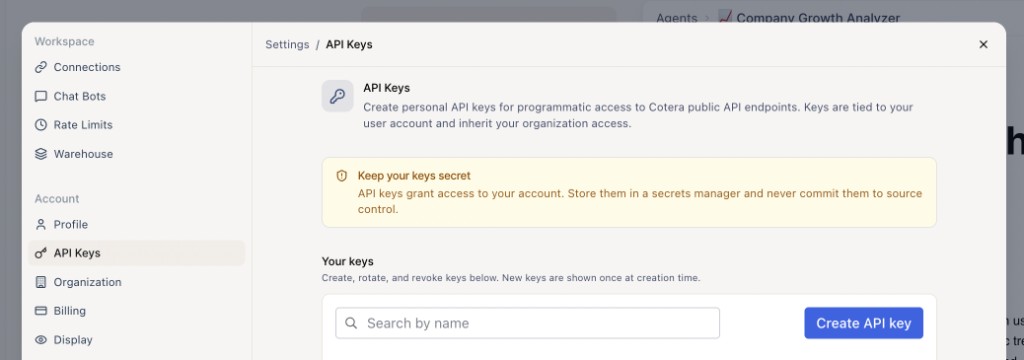
API keys grant programmatic access to Cotera public API endpoints, are tied to your user account and inherit your organization access, and should be stored in a secrets manager or Snowflake secret — never committed to source control or pasted into shared documents. The key must have access to invoke agents via the public API (public-api:access), so if your org restricts API key scopes, confirm that scope is enabled when you create the key.
Step 2: Install Cotera from Snowflake Marketplace
- Open Cotera on Snowflake Marketplace (or in Snowsight: Data Products → Marketplace → search for Cotera)
- Open the Cotera listing
- Click Get or Install and follow the prompts to install the Native App into your account
- Choose the warehouse and role the app should use, per your org's Marketplace install workflow
After installation, the app exposes schemas including cotera.agents and cotera.coco with the SQL functions above.
Step 3: Configure the app
After install, open the Cotera app in Snowsight → Apps and complete both required references in the setup wizard.
Cotera API key
Bind a generic string secret containing the Cotera API key you created in Step 1 — the wizard prompts you to create a new secret or select an existing one.
Cotera API access
Approve the external access integration for app.cotera.co:443.
The app needs this permission to make outbound HTTPS requests to the Cotera API. Without it, cotera.agents.agent() and cotera.coco.chat() fail at the network layer. Both the API key and external access references are required before the SQL functions work.
To rotate your API key later, update the secret bound to the Cotera API key reference in the app configuration page.
Step 4: Run a test query
Confirm everything works with a simple invocation using a warehouse that your role can access:
USE WAREHOUSE <your_warehouse>;

-- Test a predefined agent (replace with your agent ID)
SELECT cotera.agents.agent(
  '<your agent id>',
  'Analyze whether Notion is growing and who their main competitors are.'
) AS answer;

-- Or test Coco, Cotera's default assistant
SELECT cotera.coco.chat('Say hello in one sentence.') AS answer;
For a concrete agent to try, copy the Company Growth Analyzer into your workspace and use its agent ID in the query above.
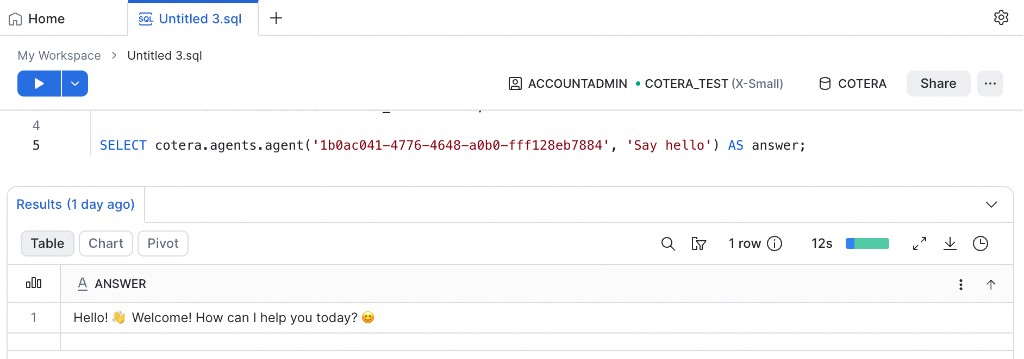
If the call succeeds, you should see the agent's text result in the answer column. If it fails, check:
- External access to
app.cotera.co:443is approved (Cotera API access reference) - The Cotera API key secret is configured in the app setup wizard
- The agent ID exists in your Cotera organization
- Your warehouse is running and your role has usage on the app
What gets installed
The Native App creates the SQL functions and configuration references below:
| Object | Purpose |
|---|---|
cotera.agents.agent(agent_id, prompt) | Calls POST /api/v1/resource/agent/{id}/invoke and returns the result text |
cotera.coco.chat(prompt) | Calls POST /api/v1/resource/coco/invoke and returns the result text |
| Cotera API access reference | Outbound HTTPS to app.cotera.co:443 (configured during install) |
| Cotera API key reference | Your Bearer token for Cotera API auth (configured during install) |
Agent runs block until Cotera completes the invocation (up to Snowflake's Python UDF time limit, typically on the order of a few minutes), and very long-running agents may hit that limit — for large batch workloads, consider scheduled runs from the Cotera platform instead. See Cotera for Enterprise.
Next steps
Once the app is installed and configured:
- Pick agents from Solutions and copy them into your workspace
- Use SQL to select which rows or cohorts should trigger agent work — see Run AI Agents from Snowflake with Cotera for row-wise, aggregate, and action patterns
- Store results in tables, join them to dashboards, or feed downstream pipelines
Snowflake defines the work. Cotera runs the agent. Your API key and external access approval are the bridge between them.
Try These Agents
Browse the full catalog on Solutions, or start with these:
- Company Growth Analyzer — Research company growth, traffic trends, and competitive landscape from a domain
- Pre-Meeting Research — Research prospects before meetings with LinkedIn and web context
- Lead Enricher & Qualifier — Qualify leads with structured scoring and CRM sync
- Market Intelligence Agent — Competitive research across hiring, reviews, and news