
Why Reliable AI Workflows Are Hard to Run From the Data Warehouse
Calling an LLM from SQL looks easy in a demo. One function, one prompt, one answer — feels agentic. Then you run the same thing on 10,000 CRM rows, or 400 inbound leads, or a weekly churn summary for the CS team, and things fall over quietly. Some rows are NULL. The Slack post never showed up. Nobody's sure which agent ran, when it ran, or why the retry created duplicate tasks for the half that succeeded first time round.
The warehouse is a great place to define what needs agent work. It's not, by itself, a good place to run that work reliably. It's why teams who start with SELECT llm(prompt) in production usually end up rebuilding orchestration in Python, Airflow, or a pile of scripts within a couple of months.
This isn't a Snowflake Cortex takedown. Cortex is genuinely good at what it's built for — summarising, classifying, extracting entities from text you already have in the warehouse. What we're talking about here is the moment the work needs to leave the warehouse: call an external API, create a CRM task, post to Slack, chain three tools together. That's a different job, and it needs a different tool. For the SQL patterns we use, see Run AI Agents from Snowflake with Cotera.
The warehouse is where you select work
Your team already expresses what matters in SQL. RevOps ranks leads by ICP fit. CS models health scores and usage drops. Finance flags weird transactions. Support joins ticket metadata to product usage to find escalation candidates.
These aren't analytics questions. They're lists of things that need someone — or something — to actually do work on them:
- Which of these 400 inbound leads should sales look at this week?
- Which accounts crossed the churn-risk threshold since yesterday?
- Which tickets in the support queue need escalating today?
- Which CRM records need enrichment before Monday's outbound push?
SQL is already how you filter, join, aggregate, and rank. The awkward part is what happens next. Usually it's someone exporting a CSV, or pasting rows into ChatGPT, or standing up a script that works fine until the enrichment API rate-limits on row 847.
Better pattern: let SQL decide which rows or cohorts get agent work, and let a runtime worry about how it runs. Snowflake picks the work. Cotera runs the agent.
AI workflows aren't just transformations
It's tempting to treat an agent call like any other warehouse function. Text goes in, text comes out, you write it back to a column. That works for summarising or classifying data you already have. It stops working the moment the "transformation" involves the outside world.
Take enriching 10,000 CRM accounts with live traffic data, headcount signals, and competitive context. Each row triggers something like:
- A Google search for recent news
- An enrichment API call for firmographics
- A SimilarWeb lookup with its own quota
- Some parsing and validation before you write anything back
That's not one LLM inference. It's a workflow — multiple tools, conditional steps, failure handling, and a defined output shape your downstream models can actually trust. SQL is fine for picking the 10,000 accounts. The workflow is what makes the enrichment reliable.
Same story for actions. A churn-risk review isn't "summarise this account." It's pulling CRM history, checking recent tickets, comparing usage against a cohort benchmark, drafting a recommended CSM action, and creating a task in the system your team actually uses. A support cohort review might classify sentiment, spot recurring themes, and route the top five to Slack. Every one of those is a workflow, not a single inference.
Hidden failure modes in production
Demos hide failure. Production surfaces it, usually quietly, until someone in CS asks why last week's brief never landed.
Here's what actually goes wrong at scale — the stuff we've watched happen more than once:
Rate limits on row 847 of 10,000. Nightly enrichment job. Each row hits an external API. Provider returns 429 after a few hundred calls. Without per-integration backoff and retry logic, half the table ends up NULL and the SQL says the job "succeeded" because the query itself didn't error.
OAuth expires mid-run. Workflow posts to Slack and creates HubSpot tasks. A token expires halfway through. First 600 rows get their actions; last 400 don't. Re-run the query, and now those first 600 have duplicate tasks. Fun.
Partial tool failures. An agent researching 400 leads calls Google, SimilarWeb, and LinkedIn per row. SimilarWeb times out on 12% of them. A raw LLM call either fails the row or makes up plausible-looking output based on the tools that did work. Neither is easy to filter for downstream.
Silent NULLs on the aggregate summary. Weekly churn brief joins 85 at-risk accounts into one prompt. Context window blows up, LLM function times out, query returns NULL. Nobody notices until the CS lead asks where the brief is.
Duplicate work on retry. Support cohort workflow creates Zendesk notes and Slack pings for 350 tickets. Job dies at 200. You re-run it. 200 tickets get double notes. Your support team hates you.
None of these are edge cases. They're what production actually looks like when you're calling external systems at volume. The SQL query is the trigger. The reliability lives in the runtime.
Why an LLM SQL function isn't enough
Snowflake's built-in LLM functions — Cortex and its equivalents in other warehouses — are useful tools. Summarise this ticket. Classify this note. Extract entities from unstructured text. Turn free text into structured columns. If that's the job, use them.
Production agent workflows want more:
| Need | LLM SQL function | Cotera agent |
|---|---|---|
| Summarise / classify / transform text | Strong fit | Possible, but often overkill |
| Call external APIs (CRM, Slack, enrichment) | Not supported | Core capability |
| Retries and rate-limit handling | Your problem | Built in |
| Multi-step workflows with state | Manual orchestration | Agent + workflow runtime |
| Predefined tools and permissions | N/A | Configured per agent |
| Observability across runs | Limited | Run history, logs, audit trail |
| Same behaviour every time | Depends on prompt | Agent instructions + workflow |
Rough rule: if the work stays inside the warehouse and it's mostly about language over data you already have, use Cortex. If it needs to leave the warehouse and act — with tools, retries, and behaviour your team can review once and trust — you want a workflow runtime.
Warehouse selects. Runtime executes.
The division of labour is straightforward:
| Layer | Responsibility |
|---|---|
| Snowflake | Define rows, cohorts, thresholds, and prompts via SQL |
| Cotera runtime | Execute predefined agents with scoped tools, retries, rate limits, and state |
| Result | Structured output returned to the query — store, join, or feed downstream models |
Your existing warehouse permissions and row-level security still apply to the data you select. The runtime handles everything after the agent's been invoked — including the failures you'd otherwise be orchestrating yourself.
Install the Cotera app from the Snowflake Marketplace (install guide), connect your Cotera workspace, and call agents from SQL using the Cotera-provided functions in your account.
Example: row-wise churn risk review
Use row-wise analysis when every account needs its own take — one account, one agent run, one structured risk assessment with recommended actions.
Your warehouse already knows which accounts are at risk. SQL builds a prompt per row. The agent — predefined with instructions and tools in Cotera — does the reasoning and any external lookups, within the boundaries you set:
WITH prompts AS (
  SELECT
    a.account_id,
    a.account_name,
    a.csm_owner,
    a.health_score,
    a.usage_drop_pct,
    a.days_since_last_login,
    CONCAT(
      'Review churn risk for account: ', a.account_name,
      '. Health score: ', a.health_score,
      '. Usage drop (30d): ', a.usage_drop_pct, '%.',
      ' Days since last login: ', a.days_since_last_login, '.',
      ' Provide risk level, top 3 reasons, and recommended CSM actions.'
    ) AS prompt
  FROM analytics.account_health a
  WHERE a.health_score < 40
    OR a.usage_drop_pct > 25
    OR a.days_since_last_login > 14
)
SELECT
  p.account_id,
  p.account_name,
  p.csm_owner,
  cotera.agents.agent('<your agent id>', p.prompt) AS churn_review
FROM prompts p;
<your agent id> is the ID of your predefined Cotera agent, configured with tools, permissions, and instructions on the Cotera side rather than ad-hoc in the SQL. SQL picks which accounts to review. The agent decides how the review actually runs, including any CRM lookups or task creation you scoped into it.
Wrap it in CREATE TABLE ... AS to persist results, or run it on a schedule so CSMs open Slack every morning to a fresh list of what needs attention.
Example: aggregate weekly churn summary
Aggregate analysis is for cohort-level takes rather than one account at a time. One prompt describes the whole set, one agent run produces a comparative summary for leadership or a Slack digest.
WITH at_risk_cohort AS (
  SELECT
    LISTAGG(
      account_name || ' (score: ' || health_score || ', drop: ' || usage_drop_pct || '%)',
      '; '
    ) WITHIN GROUP (ORDER BY health_score ASC) AS account_list,
    COUNT(*) AS account_count,
    AVG(usage_drop_pct) AS avg_usage_drop
  FROM analytics.account_health
  WHERE health_score < 50
    AND segment = 'enterprise'
)
SELECT
  cotera.agents.agent(
    '<your agent id>',
    CONCAT(
      'Produce a weekly churn risk summary for this enterprise cohort (',
      account_count, ' accounts, avg usage drop ',
      ROUND(avg_usage_drop, 1), '%): ',
      account_list,
      '. Group by risk theme, highlight the 5 highest-priority accounts, ',
      'and recommend team-level actions for the CS standup.'
    )
  ) AS weekly_churn_summary
FROM at_risk_cohort
WHERE account_count > 0;
One query, one prompt, one coordinated response. Good for a stored report row, an email brief, or a scheduled Slack post. Same reliability guarantees as row-wise runs: retries, rate-limit handling, and a run history you can actually audit when someone asks what happened.
For more patterns — row-wise enrichment, aggregate competitive briefs, action-oriented workflows — see Run AI Agents from Snowflake with Cotera.
Predefined agents matter
Reliability isn't only about retries. It's about predictability — the same row type getting the same treatment every time, with the same tools, the same output shape, and the same permissions boundary.
Ad-hoc prompts in SQL are fine for exploration. Production workflows want agents defined once in Cotera: explicit tools, reviewed instructions, an input schema your team trusts. You're not going to prompt-engineer your way to operational consistency on every nightly job.
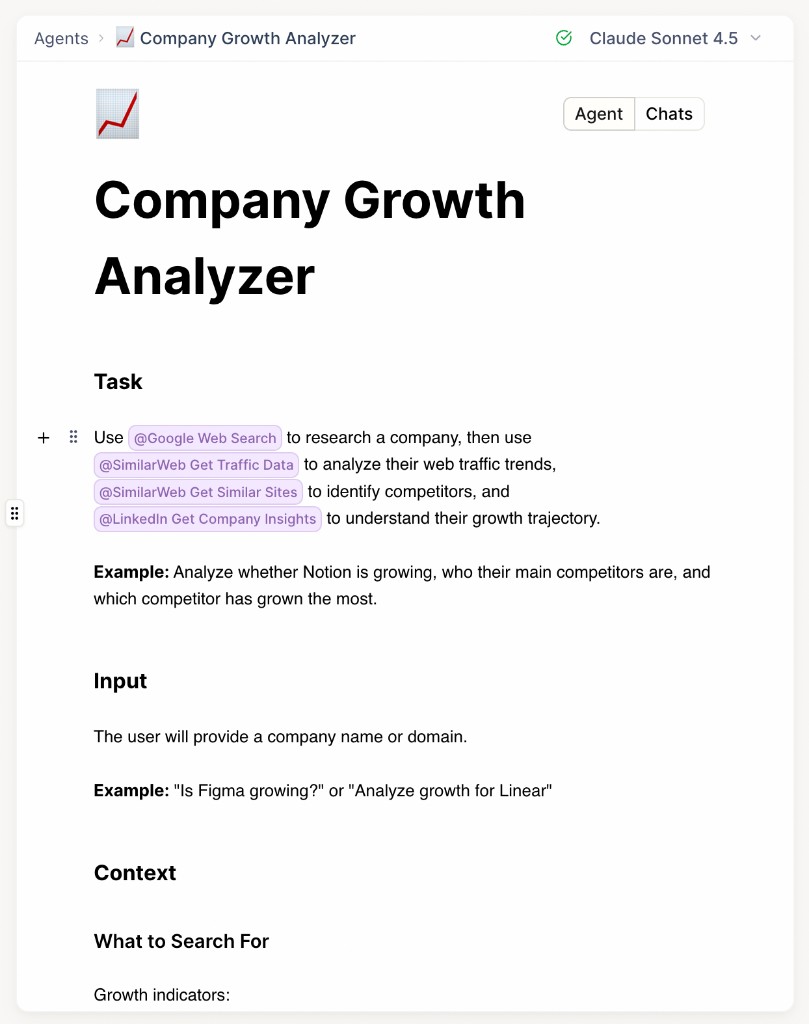
The Company Growth Analyzer is a concrete example. Google Web Search, SimilarWeb traffic data, and LinkedIn company insights are wired in as approved tools, with the task, input, and context instructions predefined. Copy it into your workspace, use its agent ID in SQL, and the same research runs whether it's for one lead or 400.
It's one of 175+ prebuilt agents on Cotera's Solutions page. Browse by team, filter by integration, copy anything you like into your workspace. SQL stays focused on selection. The runtime owns execution.
Conclusion
Calling an LLM from SQL is the easy part. Running it reliably from warehouse data — with tools, retries, rate limits, durable execution, and enough observability to actually debug things when they break — is the hard part. That's not a reason to avoid agents in the warehouse. It's a reason to keep the layers separate: SQL picks the work, the runtime runs it.
Cortex and other in-warehouse LLM functions are still the right call when the work stays inside the warehouse. Cotera is what you reach for when the work has to act — enriching from external APIs, creating CRM tasks, posting to Slack, chaining tools together, and doing it the same way every time at scale.
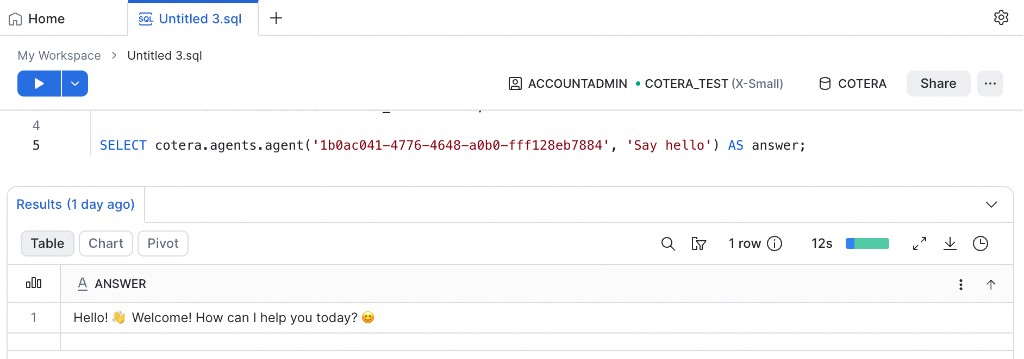
Snowflake picks the work. Cotera runs the agent. Your team gets workflows they can actually operationalise — not LLM demos that die on row 847.
Run reliable AI workflows from Snowflake with Cotera →
Try These Agents
Browse the full catalog on Solutions, or start with these:
- Company Growth Analyzer — Research company growth, traffic trends, headcount signals, and competitive landscape from a domain
- Vitally Churn Risk Detector — Flag at-risk accounts with structured risk assessments and recommended CSM actions
- Lead Enricher & Qualifier — Qualify inbound leads from CRM and warehouse data with structured scoring
- Zendesk Ticket Escalation to Slack — Triage support cohorts, apply escalation rules, and notify the right channel every time