
Run AI Agents from Snowflake with Cotera
Install Cotera from the Snowflake Marketplace to call agents directly from SQL, and see How to Install the Cotera Snowflake App if you have not set it up yet.
With Cotera, a Snowflake query can call a predefined agent that analyzes, decides, and uses approved tools — while Cotera handles workflow execution, retries, rate limits, and external systems on your behalf. Snowflake is where your team already defines what matters (accounts at risk, qualified leads, anomalous transactions, campaign segments, support escalations), SQL is a natural way to select the inputs, and Cotera is the runtime that turns those selections into reliable agent workflows rather than a one-off LLM call that might succeed or fail silently.
This is complementary to Snowflake Cortex, not a replacement: Cortex is excellent for in-warehouse summarization, classification, and semantic queries over your data, while Cotera is for when the work needs to leave the warehouse to create a CRM task, post to Slack, enrich from an external API, open a support ticket, or run a multi-step workflow with observability and retries. Snowflake selects the work, Cotera runs the agent — and for the broader case, see Why Reliable AI Workflows Are Hard to Run From the Data Warehouse and AI Agents Belong Next to Your Data Warehouse, Not Inside Your Dashboard.
Why run agents from Snowflake?
The warehouse is where operational truth lives — RevOps defines lead scores in dbt models, finance flags anomalous transactions in a nightly job, customer success tracks health scores and usage drops, marketing builds campaign cohorts from event data, and support teams join ticket metadata with product usage — and those models are not abstract datasets but lists of things that need judgment and action.
- Which of these 200 accounts should a CSM review this week?
- Which inbound leads match our ICP well enough to route to sales?
- Which transactions look like fraud before they settle?
- Which campaign segments underperformed and why?
- Which support tickets need escalation today?
SQL is already how teams express those questions — you filter, join, aggregate, and rank — but the missing piece is what happens next, when someone exports a CSV, pastes rows into a chatbot, or wires up a brittle script that breaks when an API rate-limits. Calling a Cotera agent from SQL closes that gap: the query defines which rows or cohorts get agent work, the agent (predefined with instructions and tools) does the reasoning and execution, and the result comes back to the query so you can store it, join it, or trigger downstream logic.
The basic pattern
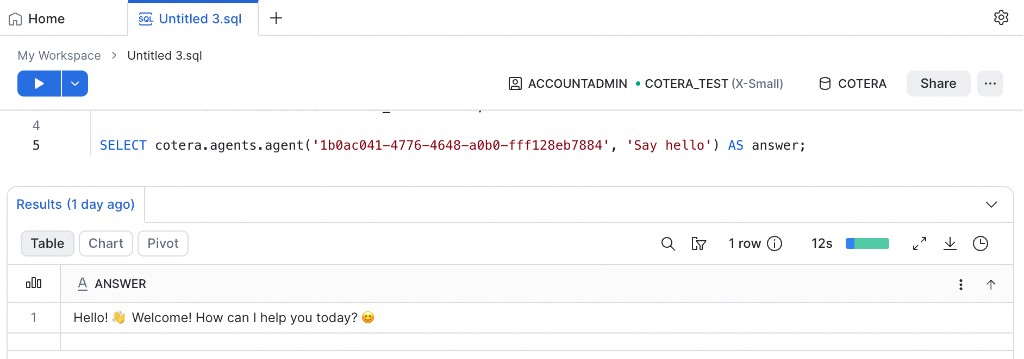
Every Snowflake + Cotera workflow follows the same three steps: build or select a prompt per row or aggregate, call the Cotera agent from SQL, and store or use the returned result. You typically keep prompts in a table or view so business logic stays versioned alongside your data models.
The examples below use Cotera's Company Growth Analyzer, an agent that takes a company name or domain and produces a growth and competitive analysis by finding the company's website and recent news via Google search, pulling SimilarWeb traffic data (visits, rankings, sources, trends), identifying similar sites and competitors, pulling LinkedIn headcount insights, and comparing the company against top competitors. Its output includes a company overview, growth assessment, traffic and employee trends, a competitive landscape table, and a key insight on who appears to be winning the space.
It is one of 175+ prebuilt agents on Cotera's Solutions page, where you can browse by team (Sales, Marketing, Customer Success, Support, Operations), filter by difficulty or integration, and copy any agent into your workspace — so copy the growth analyzer or pick another agent that fits your workflow, then use its agent ID in SQL wherever you see <your agent id>.
Here is a minimal example using a prompts table that joins warehouse data to companies worth researching:
-- one row per account that needs a growth analysis
CREATE OR REPLACE TABLE ops.company_growth_prompts AS
SELECT
  account_id,
  company_domain AS prompt
FROM analytics.crm_accounts
WHERE pipeline_stage IN ('discovery', 'qualification')
  AND growth_analysis_at IS NULL;

-- call the agent and store results
CREATE OR REPLACE TABLE ops.company_growth_results AS
SELECT
  p.account_id,
  p.prompt,
  cotera.agents.agent('<your agent id>', p.prompt) AS growth_analysis
FROM ops.company_growth_prompts p;
<your agent id> is the ID of your predefined Cotera agent — configured with tools, permissions, and instructions in Cotera, not ad-hoc in the SQL — and for the growth analyzer the prompt is typically just the company domain or name, so the SQL chooses which companies to send while the agent defines how to research them.
Finding your agent ID
Every cotera.agents.agent() call needs the agent's UUID. In the Cotera app, open the agent you want to call from Snowflake, then:
- Open the command palette —
Cmd+Kon Mac,Ctrl+Kon Windows - Search for Developer details
- Copy the Agent ID and paste it into your SQL in place of
<your agent id>
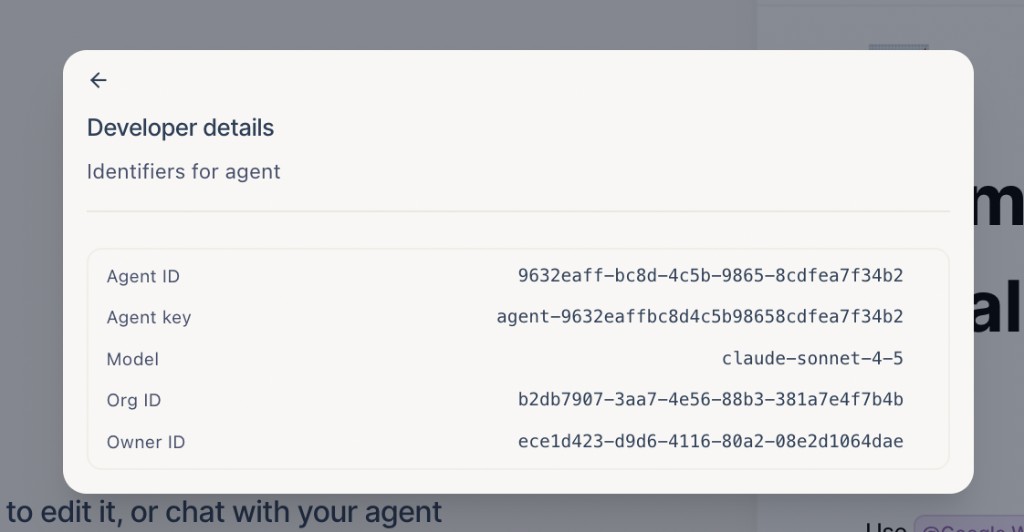
That's the value Snowflake passes to cotera.agents.agent(). If you copied an agent from Solutions, open it in your workspace first — the ID is specific to your org's copy of the agent.
You do not have to materialize a prompts table first, because a sub-CTE works the same way: select companies in a WITH clause, then call the agent on the CTE result:
WITH accounts_to_research AS (
  SELECT
    a.account_id,
    a.company_name,
    a.company_domain,
    a.deal_stage,
    a.company_domain AS prompt
  FROM analytics.crm_accounts a
  WHERE a.pipeline_stage IN ('discovery', 'qualification')
    AND a.growth_analysis_at IS NULL
)
SELECT
  r.account_id,
  r.company_name,
  r.company_domain,
  cotera.agents.agent('<your agent id>', r.prompt) AS growth_analysis
FROM accounts_to_research r;
The outer query reads from the CTE alias (accounts_to_research r) and passes r.prompt into the agent call, which works for ad-hoc analysis in a worksheet or wrapped in CREATE TABLE ... AS when you want to persist results.
Pattern 1: Row-wise analysis
Row-wise analysis fits when each record needs individual judgment — one company, one agent run, one growth report — and common use cases include growth analysis for inbound leads before sales outreach, competitive research on accounts entering the pipeline, account enrichment with traffic and headcount signals before a call, TAM research on companies matching your ICP, and partner or acquisition target screening from warehouse lists.
SELECT
  lead_id,
  company_domain,
  cotera.agents.agent('<your agent id>', company_domain) AS growth_analysis
FROM analytics.inbound_leads
WHERE created_at >= DATEADD('day', -7, CURRENT_DATE())
  AND growth_analysis IS NULL;
Each row gets its own agent run, and the agent searches Google for news, pulls SimilarWeb traffic and ranking data, checks LinkedIn headcount trends, maps competitors, and returns a structured growth assessment you can parse, filter, or write back to a results table. For high-volume workloads, run this on a schedule (nightly or hourly) rather than inline on every ad-hoc query.
Pattern 2: Aggregate analysis
Aggregate analysis fits when the insight is about a cohort or segment rather than a single company — one prompt describes the set, one agent run produces a comparative summary — and it works well for competitive landscape reports on a target market segment, growth comparisons across a batch of pipeline accounts, sector briefings before a QBR or board review, or summarizing which companies in a cohort show the strongest growth signals.
WITH expansion_targets AS (
  SELECT
    LISTAGG(company_domain, ', ') WITHIN GROUP (ORDER BY expansion_score DESC) AS domain_list,
    COUNT(*) AS company_count
  FROM analytics.accounts
  WHERE expansion_score > 80
    AND segment = 'mid_market_saas'
)
SELECT
  cotera.agents.agent(
    '<your agent id>',
    CONCAT(
      'Analyze growth and competitive landscape for these companies: ',
      domain_list,
      '. Compare traffic trends, employee growth, and rank who appears to be winning in this space.'
    )
  ) AS segment_growth_summary
FROM expansion_targets
WHERE company_count > 0;
One query, one prompt, and one agent response — suitable for a Slack digest, email brief, or stored report row.
Pattern 3: Row-wise actions
Analysis is useful, but action is where production gets hard, and the growth analyzer is a good example of why: each row triggers an agent that does not just return text but calls external tools (Google search for news, SimilarWeb for traffic and competitor data, LinkedIn for headcount growth), which means multiple APIs per row, each with its own rate limits and failure modes. The agent is configured in Cotera with explicit tools and permissions, so the SQL still selects which companies get researched while the agent handles the multi-step tool chain within the boundaries you set.
Common use cases include enriching CRM accounts with live traffic and headcount data, researching competitors for every new inbound lead, refreshing growth signals on accounts entering a new pipeline stage, and running batch competitive intel on target accounts from a warehouse list.
SELECT
  account_id,
  company_domain,
  owner_email,
  cotera.agents.agent('<your agent id>', company_domain) AS growth_analysis
FROM analytics.crm_accounts
WHERE deal_stage = 'discovery'
  AND growth_analysis_at IS NULL
  AND created_at >= DATEADD('day', -14, CURRENT_DATE());
Why you need an agent runtime, not just an LLM call
External APIs fail, rate limits hit, and OAuth tokens expire — a raw LLM function in SQL can generate text, but it cannot reliably call SimilarWeb, retry a Google search on timeout, backoff on a 429 from LinkedIn, or resume a half-finished research workflow. Production row-wise research needs retries with sensible backoff, rate-limit handling per integration, state so partial failures do not duplicate work, observability so ops can see what ran and what failed, and predefined behavior so the same row type gets the same process every time. Cotera provides that runtime; Snowflake provides the trigger and the data selection.
Pattern 4: Aggregate actions
Aggregate actions combine one cohort-level prompt with an agent that produces a shared output — a competitive brief, segment report, or market landscape summary — and they work well for weekly competitive landscape reports on a target segment, market briefs on expansion cohorts, executive summaries of who is winning in a vertical, or pre-call research packs for a strategic account cluster.
WITH strategic_cluster AS (
  SELECT
    LISTAGG(company_name || ' (' || company_domain || ')', ', ')
      WITHIN GROUP (ORDER BY arr DESC) AS company_list,
    COUNT(*) AS company_count,
    SUM(arr) AS total_arr
  FROM analytics.accounts
  WHERE vertical = 'fintech'
    AND arr > 100000
    AND competitive_brief_at IS NULL
)
SELECT
  cotera.agents.agent(
    '<your agent id>',
    CONCAT(
      'Produce a competitive landscape analysis for this fintech cluster (',
      company_count, ' companies, $', total_arr, ' combined ARR): ',
      company_list,
      '. For each company, include monthly visits, global rank, growth signal, ',
      'and a key insight. End with who appears to be winning and why.'
    )
  ) AS competitive_brief
FROM strategic_cluster
WHERE company_count > 0;
One agent run produces one coordinated research output across the whole cohort — with the same reliability guarantees as row-wise runs.
Why not just use an LLM function?
Snowflake's built-in LLM functions — and Cortex more broadly — are genuinely useful for summarizing text, classifying tickets, extracting entities from notes, and transforming unstructured input into structured columns, and for in-warehouse text operations on data you already have, they are the right tool. Production agent workflows need more:
| Need | LLM SQL function | Cotera agent |
|---|---|---|
| Summarize / classify / transform text | Strong fit | Possible, but often overkill |
| Call external APIs (CRM, Slack, enrichment) | Not supported | Core capability |
| Retries and rate-limit handling | Your problem | Built in |
| Multi-step workflows with state | Manual orchestration | Agent + workflow runtime |
| Predefined tools and permissions | N/A | Configured per agent |
| Observability across runs | Limited | Run history, logs, audit trail |
| Same behavior every time | Depends on prompt | Agent instructions + workflow |
Use Cortex (or similar) when the work stays inside the warehouse and is primarily about language over your data. Use Cotera when the work needs to act — with tools, reliability, and a predefined process your team can review once and trust at scale.
How Cotera fits
The division of labor is straightforward: Snowflake selects the work by defining rows, cohorts, thresholds, and prompts in SQL; Cotera runs the agent with predefined instructions, scoped tools, execution, retries, and integrations; and the result comes back to the query so you can store it in a table, join it to dashboards, or feed the next step in your pipeline.
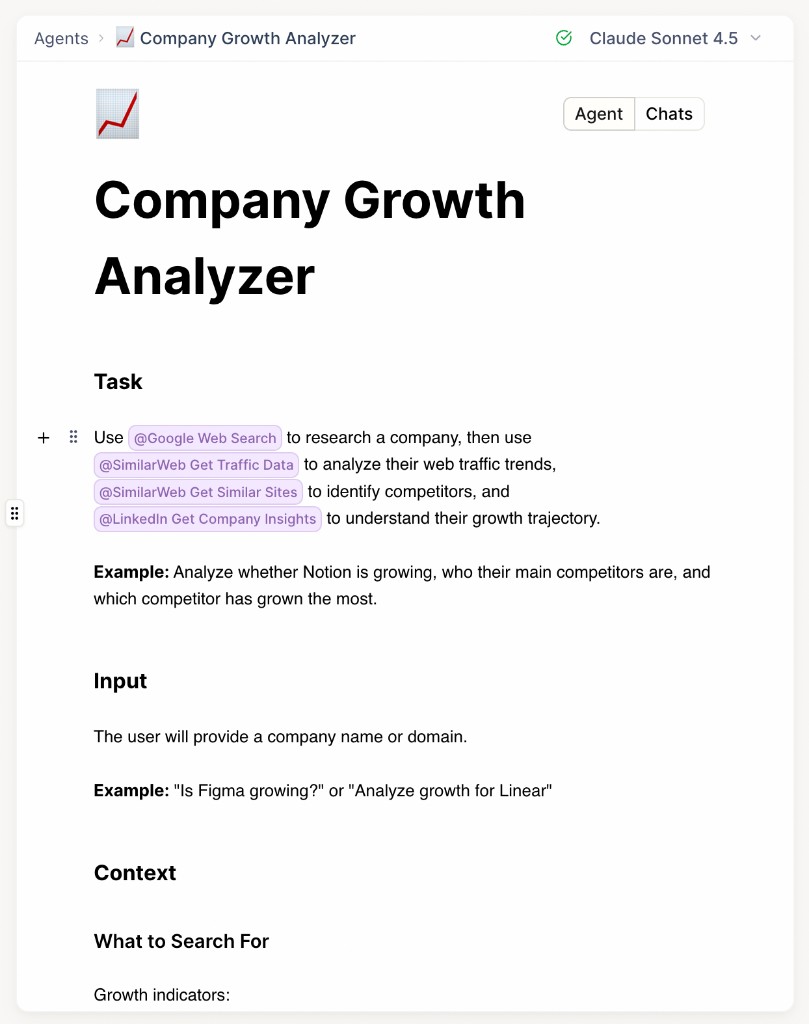
Agents are defined once in Cotera with the tools they are allowed to use, the instructions they follow, and the output shape you expect, and the Company Growth Analyzer is a concrete example with Google Web Search, SimilarWeb traffic and competitor data, and LinkedIn company insights wired in as approved tools, with task, input, and context instructions predefined. You do not have to build from scratch — Solutions lists prebuilt agents for lead research, CRM enrichment, support triage, competitive intel, and more — so copy one into your workspace, grab the agent ID, and call it from SQL.
Install the Cotera app from the Snowflake Marketplace (install guide), connect your Cotera workspace, and call agents from SQL using the Cotera-provided functions in your account; your existing warehouse permissions and row-level security still apply to the data you are selecting, and Cotera handles everything that happens after the agent is invoked.
For larger workloads — millions of rows, scheduled enrichment, writeback to CRM — you can also run agents against warehouse tables from the Cotera platform on a schedule, and the SQL-in-Snowflake pattern and the scheduled dataset pattern share the same agent definitions. See Cotera for Enterprise for how teams run agents at warehouse scale.
Example use cases
- Lead qualification from warehouse records — score and route inbound leads based on firmographics and product usage
- Churn risk review — flag at-risk accounts with reasons and recommended CSM actions
- Support ticket triage — prioritize, classify, and escalate based on tier, sentiment, and history
- Campaign performance analysis — weekly narrative on segment performance with recommendations
- Account enrichment — pull external data and write structured fields back to CRM
- Weekly metric commentary — leadership-ready summary from aggregated KPIs
- Product usage review — cohort analysis with suggested outreach or success plays
- Fraud/risk review — analyze flagged transactions with structured risk assessments
- Slack/CRM/task creation — turn query results into actions in the tools your team already uses
Conclusion
If your team already uses Snowflake to define the rows, cohorts, and metrics that matter, Cotera lets you turn those query results into reliable AI agent workflows — not one-off LLM experiments that break when an API hiccups. Snowflake selects the work, Cotera runs the agent, and your team gets analysis and action they can actually operationalize.
Run AI agents from Snowflake with Cotera →
Try These Agents
Browse the full catalog on Solutions, or start with these:
- Company Growth Analyzer — Research company growth, traffic trends, headcount signals, and competitive landscape from a domain
- Lead Enricher & Qualifier — Qualify inbound leads from CRM and warehouse data with structured scoring
- HubSpot Contact Enrichment — Enrich contacts from external sources and write structured updates back to CRM
- Market Intelligence Agent — Monitor competitors, hiring patterns, and market moves across your target accounts